Python的条件控制
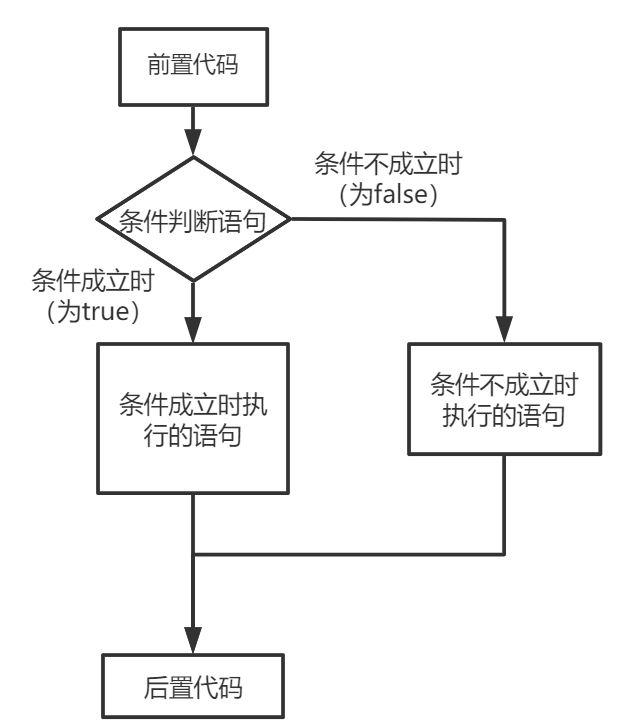
if语句
python 中 if 语句结构一般如下:
if condition_1:
    operate_1
elif codition_2:
    operate_2
else:
    operate_3
- 如果 "condition_1" 为 True 将执行 "operate_1" 块语句
- 如果 "condition_1" 为False,将判断 "condition_2"
- 如果"condition_2" 为 True 将执行 "operate_2" 块语句
- 如果 "condition_2" 为False,将执行"operate_3"块语句
注意:
- 在 python 中 elif 代替了 else if
- 条件后要加冒号 :
- 使用缩进来区分代码块
我们可以试着写一个简单的条件判断:
first_age = input('输入第一个年龄:')
second_age = input('输入第二个年龄:')
if first_age > second_age:
    print('第一个年龄比较大')
elif first_age < second_age:
    print('第二个年龄比较大')
else:
    print('这两个年龄一样大')
if嵌套
条件判断内也可以添加嵌套判断,形如:
if 表达式1:
    语句
    if 表达式2:
        语句
    elif 表达式3:
        语句
    else:
        语句
elif 表达式4:
    语句
else:
    语句
可以试着写一个:
while True:
    user_input = input('输入性别和年龄(空格分隔,如:男 25):\n').strip().split()
    if len(user_input) != 2:
        print(f'错误:需要输入2个值,你只输入了{len(user_input)}个')
        continue

    sex, age_str = user_input

    if not age_str.isdigit():
        print('错误:年龄必须是数字')
        continue

    age = int(age_str)
    break

if sex == '男':
    if age >= 18:
        print('成年男性')
    else:
        print('未成年男性')
elif sex == '女':
    if age >= 18:
        print('成年女性')
    else:
        print('未成年女性')
else:
    print('性别输入有误,请输入"男"或"女"')
match...case语法
Python增加了 match...case 的条件判断,不需要再使用一连串的 if-else 来判断
match 后的对象会依次与 case 后的内容进行匹配,如果匹配成功,则执行匹配到的表达式,否则直接跳过,case_ 则是可以匹配一切内容
match content:
    case condition:
        print()
    case condition_1:
        print()
    case condition_2:
        print()
    case _:
        print()
我们也还是写个例子:
content = int(input('输入1-3的数字\n'))
match content:
    case 1:
        print('这个是 1')
    case 2:
        print('这个是 2')
    case 3:
        print('这个是 3')
    case _:
        print('这个不是 1-3')